
Why folders don't work
I used to organize photos into folders: "Vacations/2024/Italy," "Family/Birthdays," "Work/Headshots." It falls apart immediately. Where does a photo of my family eating lunch in Rome go? Vacations? Family? Both?
You end up either duplicating files or picking one folder and losing the ability to find the photo from any other angle. I gave up on folder-based organization years ago.
My system
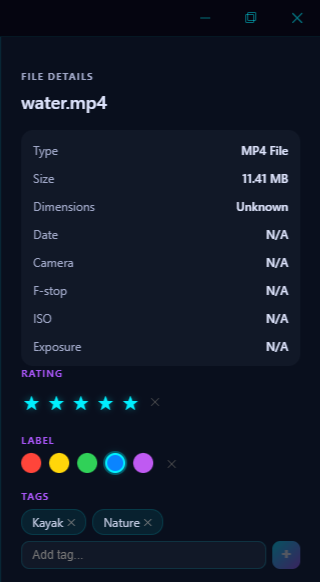
I keep all my photos in one flat library. No nested folder structure. All the organization happens through metadata: tags, ratings, and smart albums.
Here's my actual tag vocabulary. It's intentionally small: maybe 30 tags total:
People: I don't tag people manually. Face detection handles this. I just name each person once and it groups everything.
Event type: birthday, wedding, holiday, trip, concert, school
Setting: home, outdoors, restaurant, beach, city, park
Content: food, pet, sunset, snow, flowers
Status: edit-needed, printed, shared, favorite
That's it. I don't try to describe every photo. Most photos get 1–3 tags. The goal is just enough metadata that I can find things later.
How I apply tags
When I import a batch of photos, I do a quick pass:
- Star rating first. I scroll through and 5-star anything great, 4-star anything good, 1-star anything blurry or accidental. This takes about 30 seconds per 100 photos if I'm quick about it.
- Batch tag the group. If it's 200 photos from a beach trip, I select all and tag: "trip, beach, outdoors." Three tags for 200 photos. Done.
- Color labels for action items. Red = needs editing. Green = ready to share. Yellow = need to decide if I keep this.
In Pluto Photos, I select a range of photos, right-click, and apply tags and ratings in bulk. The whole tagging pass for a 300-photo import takes about two minutes.
Smart albums do the rest
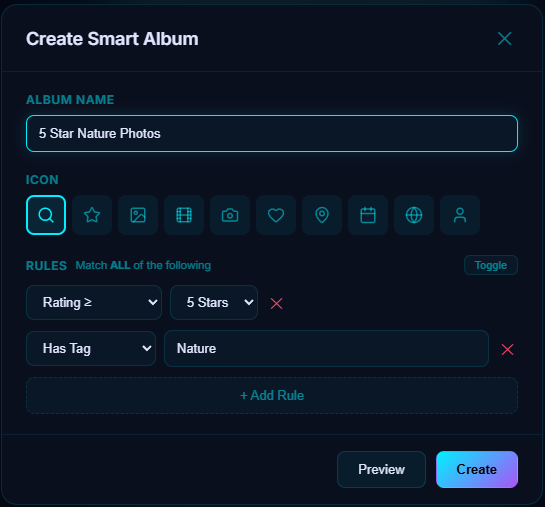
Here's where it pays off. I have smart albums set up like:
- "Best of 2025" → Date in 2025 AND rating ≥ 4 stars
- "Beach trips" → Tag contains "beach"
- "Birthdays" → Tag contains "birthday," sorted by date
- "Needs editing" → Color label is red
- "Untagged" → No tags assigned (this is my to-do list)
These update automatically. Every time I import and tag photos, they show up in the right albums without me doing anything.
The "Untagged" album is key
The smartest thing I set up was a smart album that shows photos with zero tags. After every import, I check this album. If it's empty, I know everything is categorized. If it has 50 photos, I know exactly what needs attention.
It turns organization from "I should probably go through my photos someday" into a concrete, clearable inbox.
What I'd tell a beginner
Don't overthink it. Pick 15–20 tags that cover 90% of your photos. Star your favorites as you go. Let smart albums handle the sorting. The system only needs to be good enough that when you think "where's that photo from the birthday party at the park?" you can find it in under 10 seconds.
Pluto Photos supports all of this: tags, star ratings, color labels, batch operations, and smart albums. Try it free with up to 500 photos.