
A Full Video Editor. Built Right In.
Multi-clip storyboard editing with cinematic effects, LUT color grading, green screen, text & image watermarks, audio overlays, transitions, and repair presets. All without leaving Pluto Photos.
- $29Once: not per month
- 0Watermarks on your export
- 6+Built-in LUTs, plus your own .cube files
- 100%Offline: no account, no render cloud
A Premiere Pro alternative for real edits
Trim, reorder, grade, title and export, the things most people actually open a video editor to do, without a monthly subscription.
No watermark, ever
Exports render at source resolution with nothing stamped on them. The only watermark is one you place yourself.
Grade it like a colorist
Six built-in LUTs and support for your own .cube files, plus per-clip exposure, contrast, saturation and temperature.
Green screen with a live preview
Pick the backdrop with an eyedropper and drag tolerance until the edges are clean. You see it happen as you drag.
Your clips are already here
The editor lives inside your media library, so there is no export-then-reimport round trip between two apps.
Works with the network off
No account, no license check-in, no cloud render queue. It edits and exports on a plane.
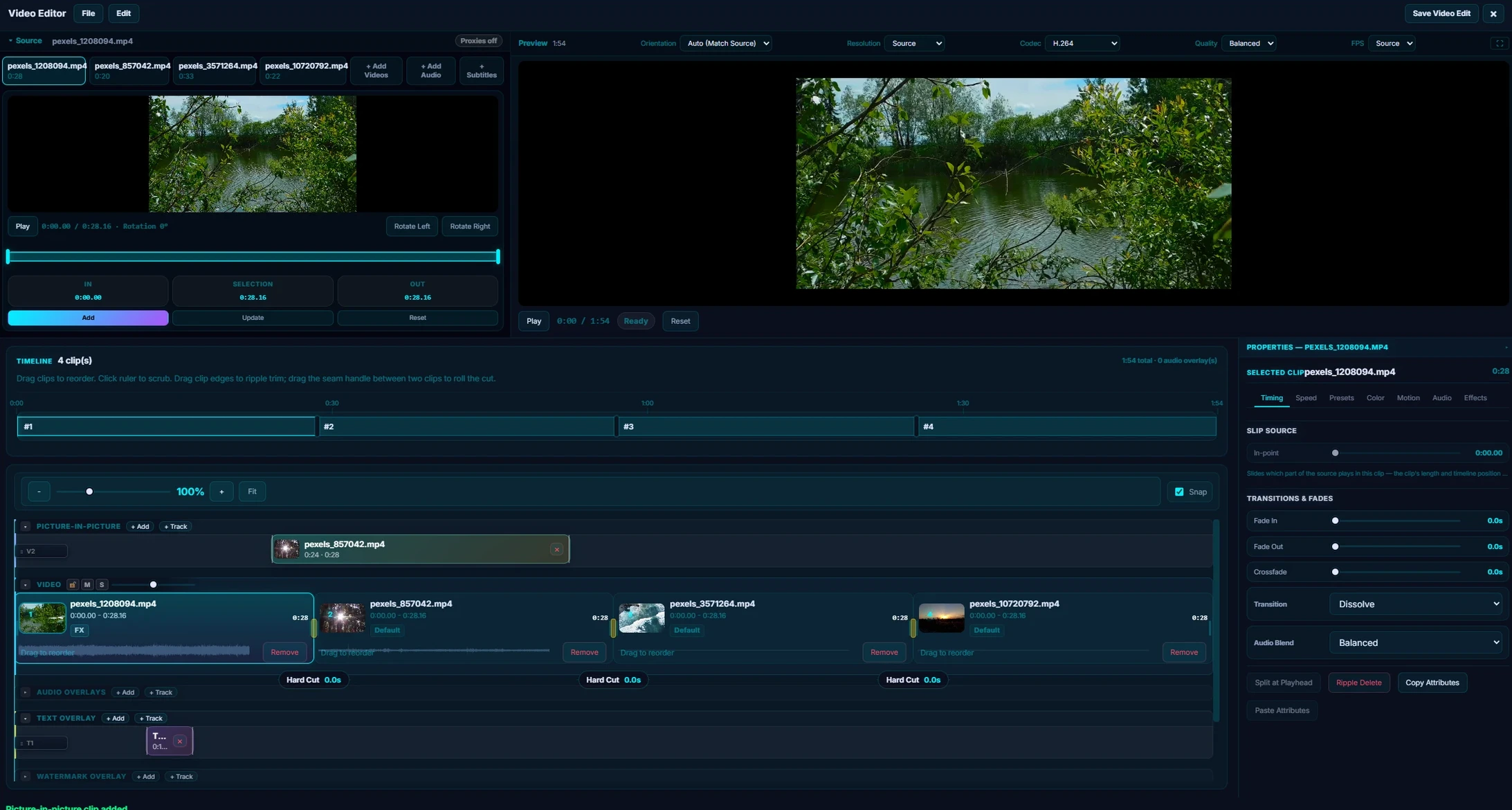
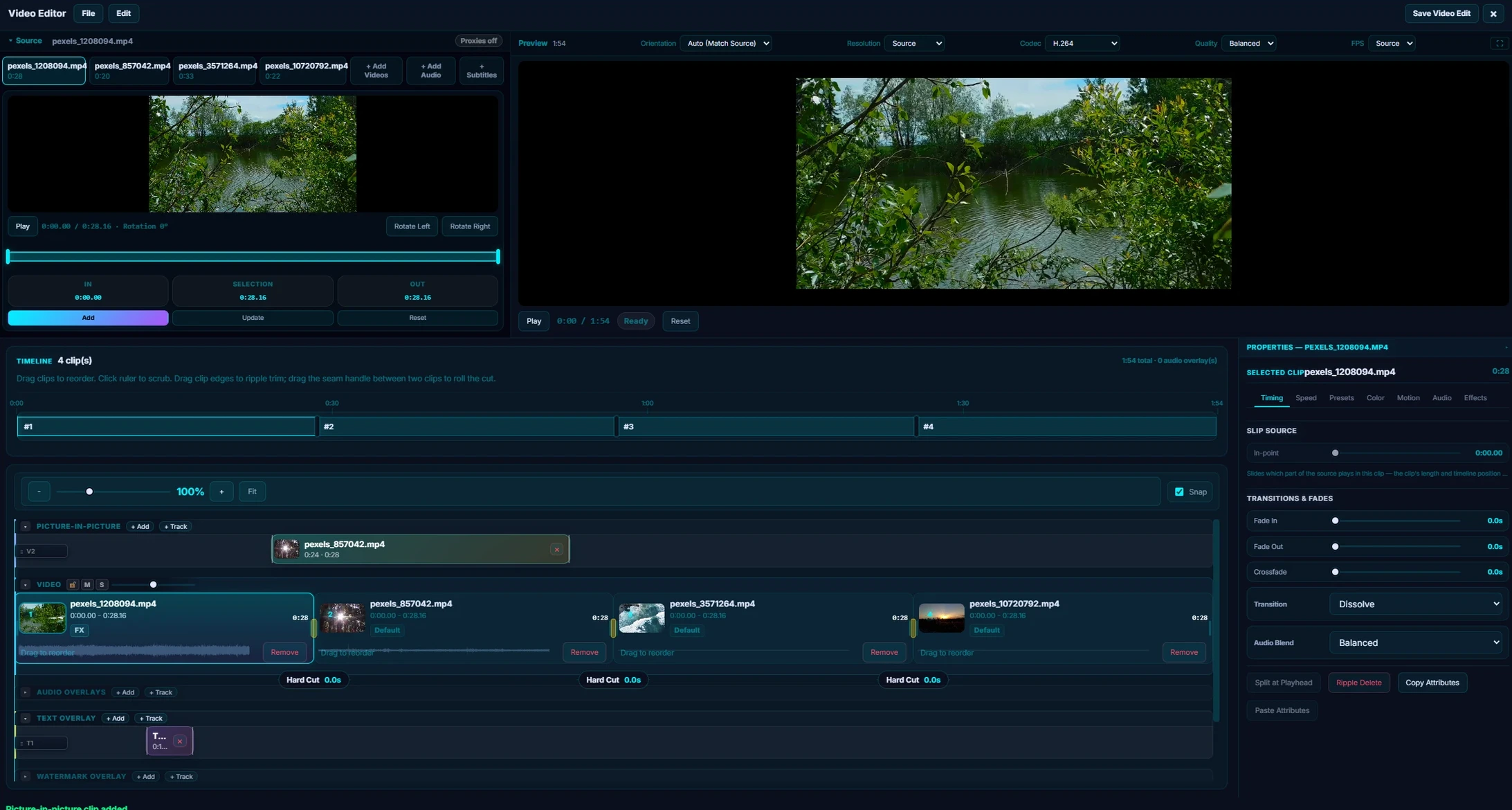
Pluto Photos includes a multi-track video editor that handles everything from quick trims to full storyboard projects. No separate app, no re-importing files. Your clips are already in your library.
It is deliberately scoped at the edit most people actually make: a handful of clips, a grade so it does not look like phone footage, music, a title, and one export. For that, it replaces a Premiere Pro subscription at $29 once. For multicam, nested sequences or an After Effects round trip, it does not, and that page says so plainly.
Everything below runs entirely offline. There is no account, no license check-in and no cloud render queue; your footage never leaves your machine.
Multi-Clip Storyboard
Add clips to a visual timeline, drag to reorder, split at the playhead. Each clip has independent in/out points so you can use different sections of the same source video. Build complete edits from multiple source videos with drag-and-drop ease.
Transitions & Fades
Crossfade and dip-to-black between clips. Drag the transition handles on the timeline to set the duration. You see it update in real time. Each clip also supports individual fade-in and fade-out controls.
Cinematic Effects
Every clip on your timeline has an Effects tab with six tools you can stack and tweak:
- Letterbox bars: Add horizontal black bars for a widescreen cinema look (16:9 up to 2.39:1)
- Vignette: Darken the edges to draw focus to the center of the frame
- Film grain: Add organic texture, from barely visible to full film-stock look
- Blur: Gaussian blur for dreamy sequences or transitions
- LUT color grading: Six built-in LUTs: Cinematic Warm, Cinematic Cool, Vintage Film, Teal & Orange, Desaturated, High Contrast B&W. Load your own .cube files for custom looks
- Green screen (chroma key): Pick any backdrop color with the eyedropper and remove it. Adjust tolerance for clean edges
Effects Presets
Three one-click starting points:
- Trailer Look: 70% letterbox, 35% vignette, 15% grain
- Dreamy: 30% blur, 20% vignette
- Retro Film: 50% vignette, 45% grain
Each preset is adjustable: apply it, then fine-tune individual sliders.
Text & Image Watermarks
Overlay text or image watermarks on your exported video. Place them anywhere on the frame with full control over:
- Position: Drag to place, or snap to corners and edges
- Size & opacity: Scale and fade to taste
- Text styling: Font, color, shadow, and outline options
- Image overlays: Drop a PNG logo and it's composited onto every frame
- Timing: Show the watermark for the full video or only on specific clips
Use it for branding, subtitles, copyright notices, or lower-third titles. The watermark is baked into the export. No post-processing needed.
Audio Overlays
Layer multiple audio tracks over your project: music, narration, sound effects, or voiceover. Each audio overlay has full controls:
- Trim & position: Cut to length and drag to the exact position on the timeline
- Volume: Independent volume per track, plus master volume for clip audio
- Crossfade: Smooth blend between clip audio and overlay tracks
- Stack tracks: Add background music and narration simultaneously
- Ducking: Lower music volume automatically when narration is playing
Drop an MP3, WAV, or AAC file onto the timeline and it's ready to use. No import step, no conversion.
Per-Clip Controls
Each clip has its own settings for:
- Fade in/out duration
- Exposure, contrast, saturation, temperature, tint
- Volume, audio clarity, denoise
- Stabilization and jello repair
Repair Presets
One-click fixes for common problems:
- Clean Dialogue: Boosts voice, reduces background noise
- Low Light Rescue: Bumps exposure and reduces grain
- Mobile Cleanup: Stabilizes shaky phone footage
Live Preview
All effects show in the preview window in real-time. Letterbox, vignette, grain, and blur render as CSS overlays. Chroma key processes frames pixel-by-pixel on a canvas element, the background disappears live as you adjust tolerance.
Export at Source Quality
Your final video renders at the original resolution with a progress bar. No watermarks on output, no quality loss.
Try Video Editor in Pluto Photos
Download free for Windows, macOS, or Linux. Video Editor is available in the Pro tier.