What's New in Pluto Photos

New features, shipped. No subscriptions required to upgrade, updates are free forever.

Releasedv2.5.2October 2026

Search by Describing the Photo

Describe what is in the photo and Pluto finds it, even when the words are nowhere in the file name. It all happens on your own computer, and nothing is uploaded.
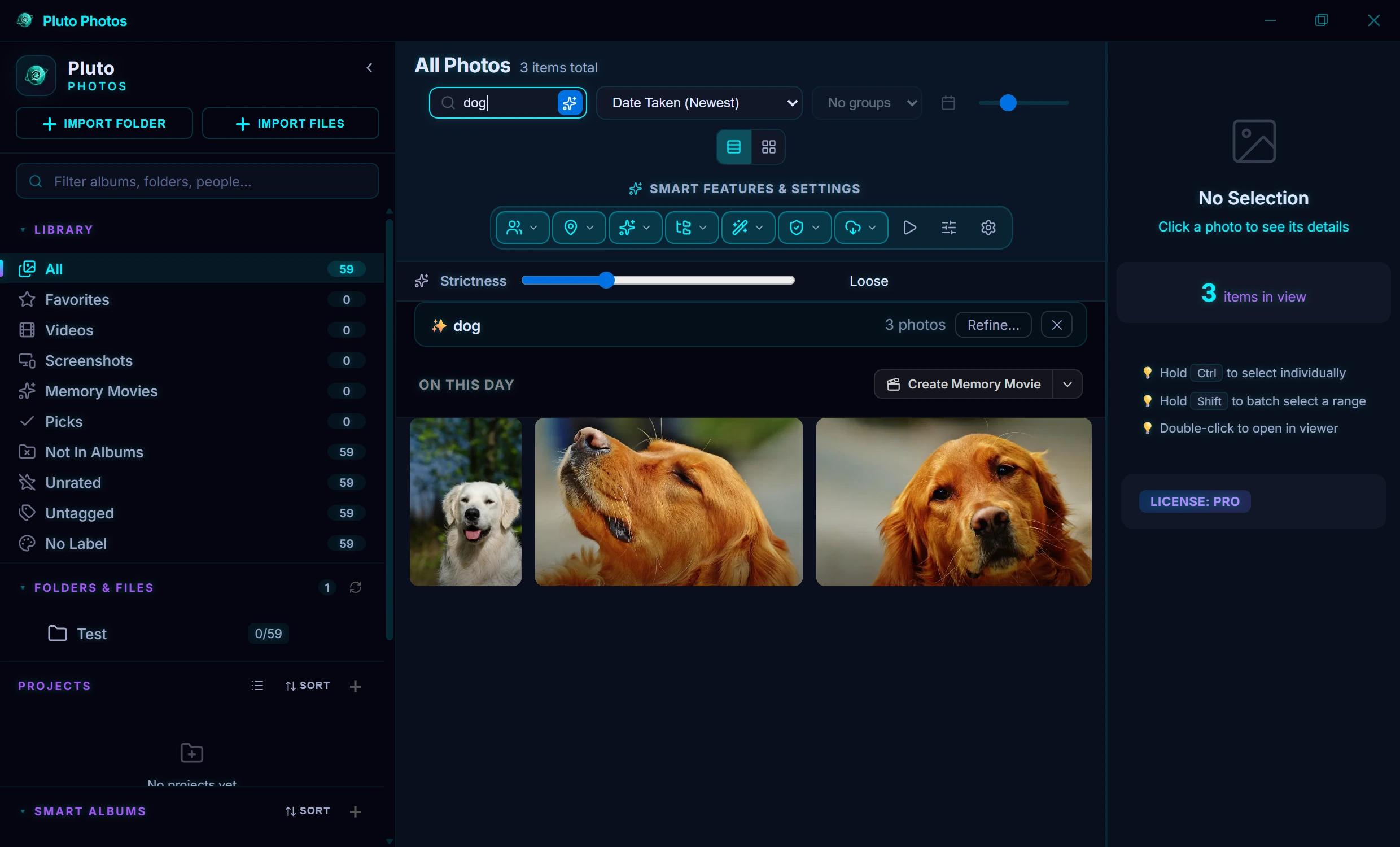
The search box in Pluto Photos set to describe photos, with three photos of dogs found in a library and a slider for how strict the match is
  • Results are ranked by how closely they match, with a slider to make the search stricter or looser
  • Understands everyday requests like “dogs without people” or “videos from last summer”
  • Also finds the words and numbers inside photos, such as receipts, signs and screenshots
  • New photos are picked up automatically in the background
WindowsmacOSLinuxPro
Releasedv2.5.2October 2026

A Faster, Smarter Scanner

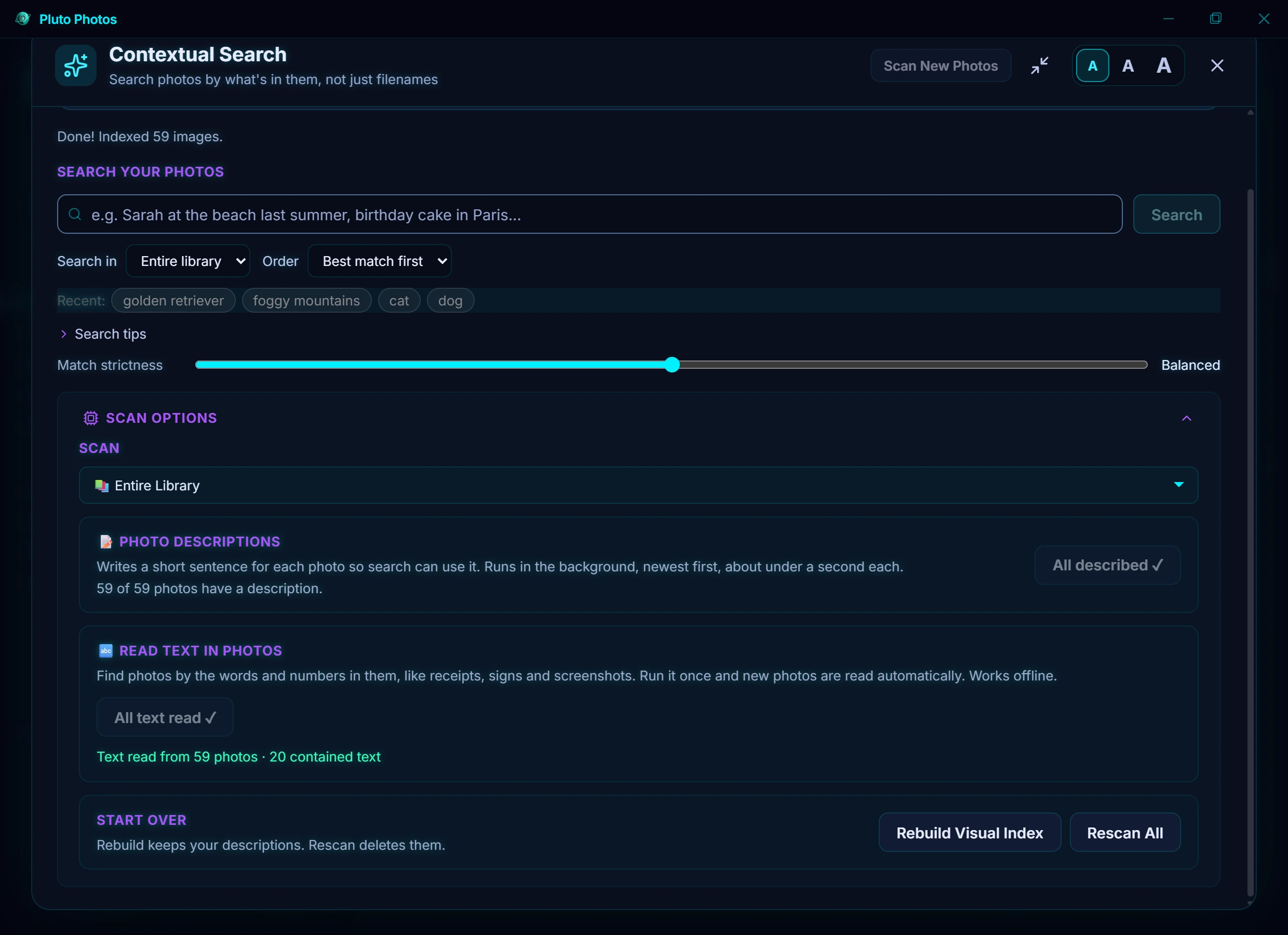
Pluto gets your library ready for Contextual Search quietly in the background. It is now quicker, more reliable and easier to follow.

The scanner in Pluto Photos, showing the options for writing photo descriptions and reading the text in photos
  • Photo descriptions are written up to 8 times faster on a Windows PC with a graphics card
  • Scanning pauses while you use your computer and carries on when you stop
  • Photos that could not be read the first time are tried again, and Rescan All asks before it deletes anything
  • Choose what to scan: your whole library, one album or one folder, with a clear time estimate
WindowsmacOSLinuxPro
Releasedv2.5.2October 2026

Faster, Smoother, Lighter

A round of speed work across the whole app, aimed at everyday laptops as much as fast desktops.

  • Large libraries scroll, zoom and resize more smoothly
  • The People screen no longer freezes Pluto for a moment while it opens
  • Searching right after you open Pluto no longer makes you wait
  • Pluto starts fewer background workers and keeps the photo editor’s undo history within a memory limit
WindowsmacOSLinux
Releasedv2.5.1October 2026

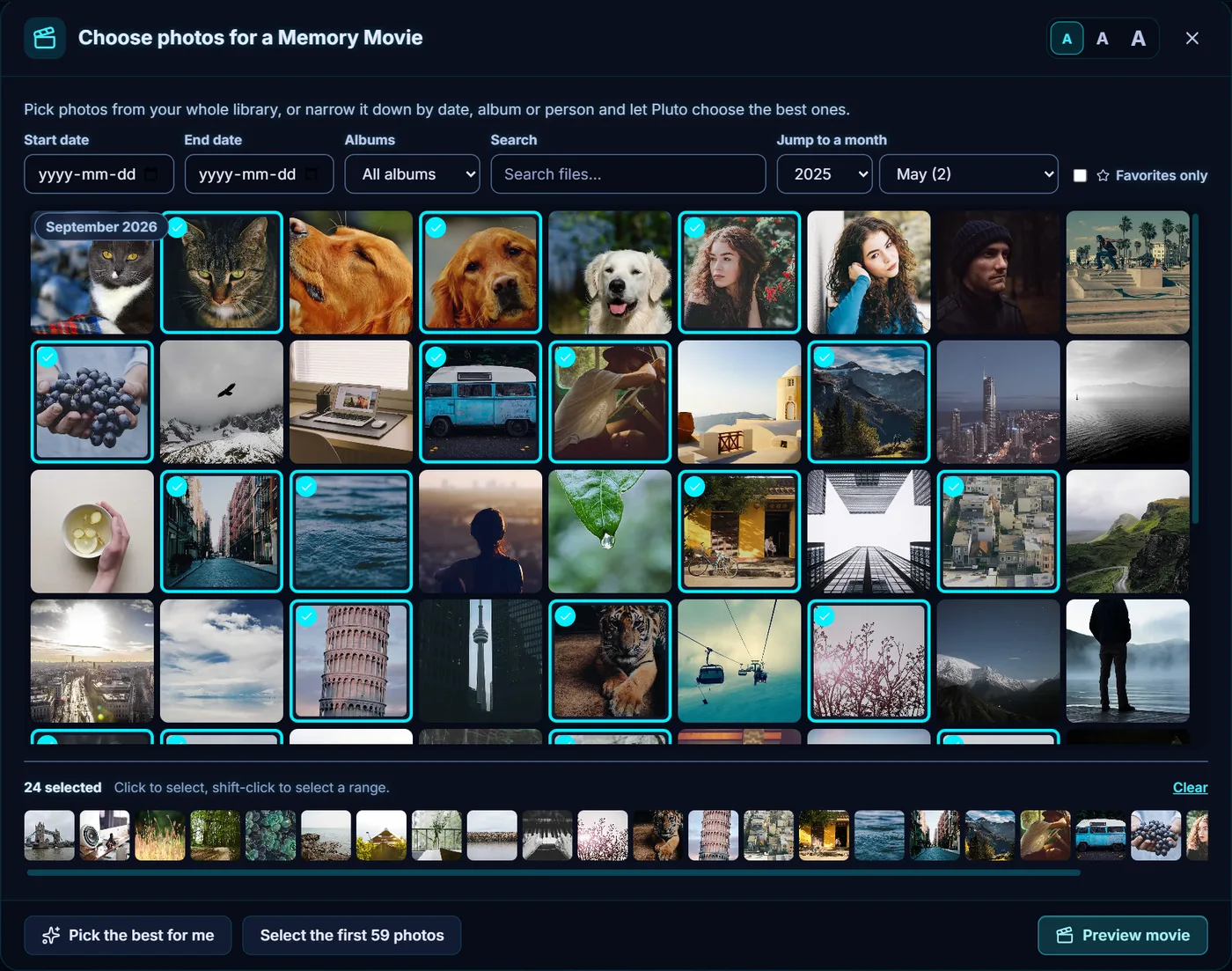
Choose the Photos for Your Memory Movie

A Memory Movie is no longer limited to one day or one trip. Browse your whole library and pick exactly the photos you want, or narrow it down and let Pluto choose the best ones. It is all made on your own computer.

The Memory Movie photo picker in Pluto Photos, with a library of photos and 24 of them chosen
  • Filter by date, album, person or file name, and jump straight to any month or year
  • Click to select, shift-click for a range, and trim your choice in the tray below
  • Let Pluto choose the best photo from each stretch of time, skipping near-duplicates
  • A reel longer than its soundtrack repeats the music with a smooth crossfade instead of going quiet
WindowsmacOSLinuxPro
Releasedv2.5.1October 2026

Face Recognition Is Your Choice

Pluto now asks before it recognises faces, streams video to your phone more smoothly, and has had a round of fixes to how its windows fit.

  • Face recognition is off until you turn it on. Pluto asks the first time, and you can turn it off, or delete all stored face data, from the More menu on the People screen
  • With the latest Pluto Companion app, videos start within a couple of seconds and adapt to your connection, at home or away
  • A phone you pair for the first time can reach your computer away from home straight away (Pluto Companion update)
  • The photo viewer, the slideshow and every dialog were checked at laptop sizes and the largest text size, and fixed wherever something was cut off
  • Settings now lists the AI models and open-source libraries Pluto is built on, with their licences
WindowsmacOSLinuxAndroid
Releasedv2.5.0October 2026

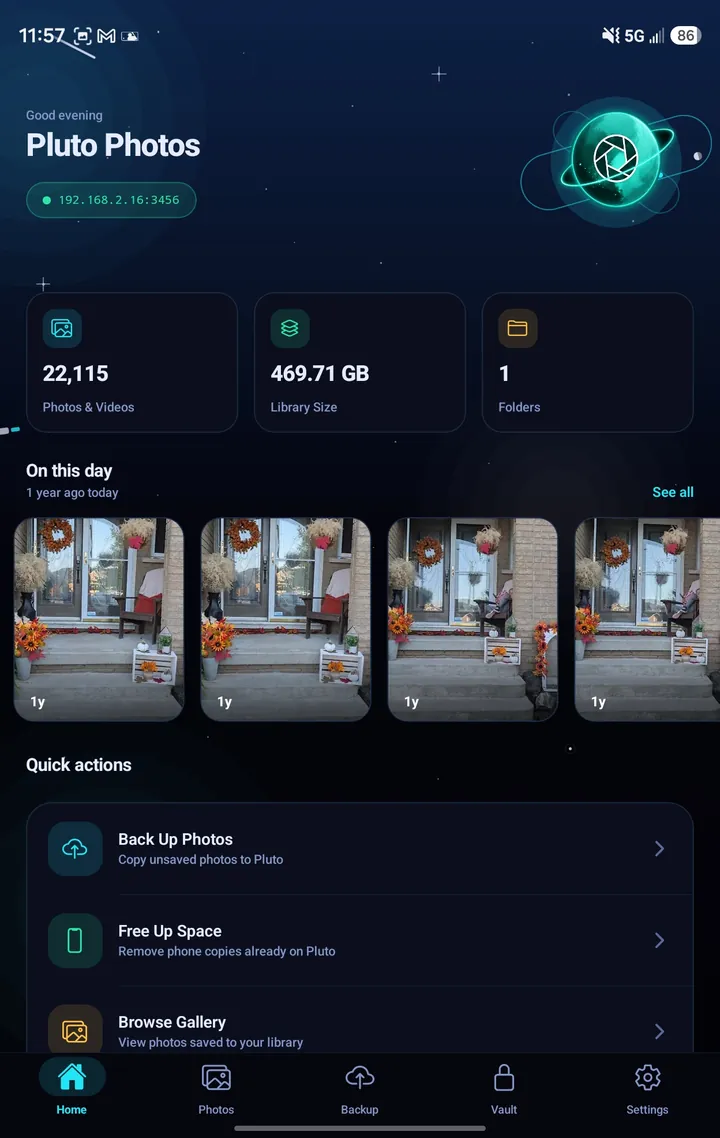
Pluto Companion for Android

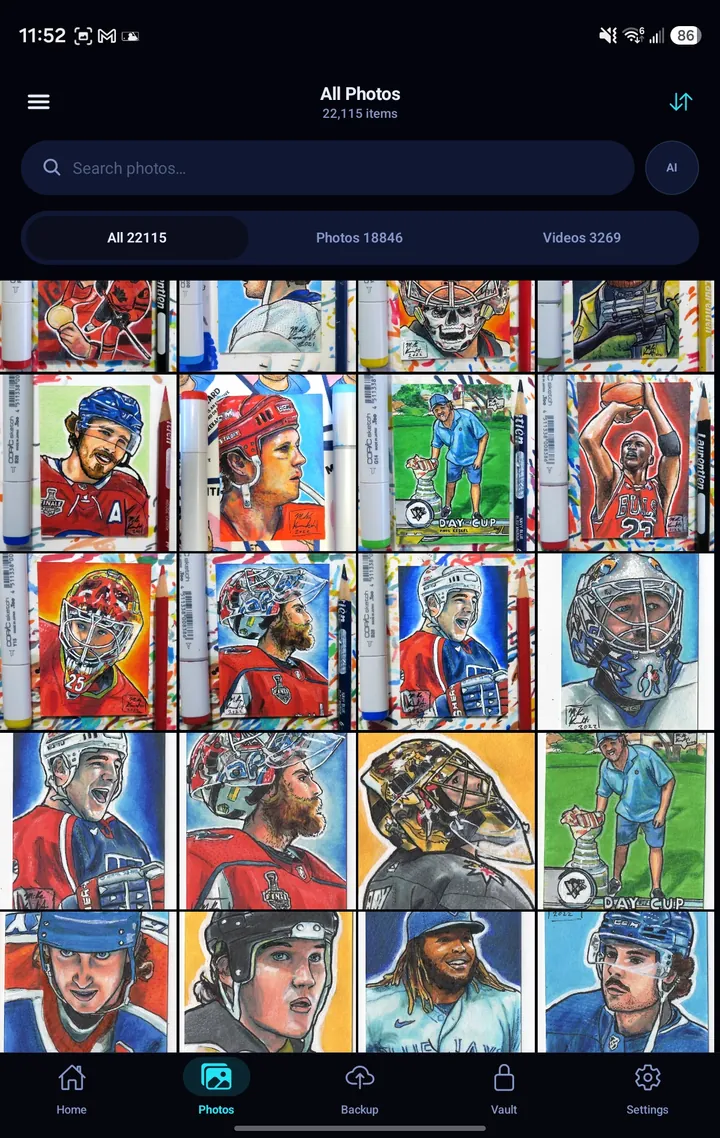
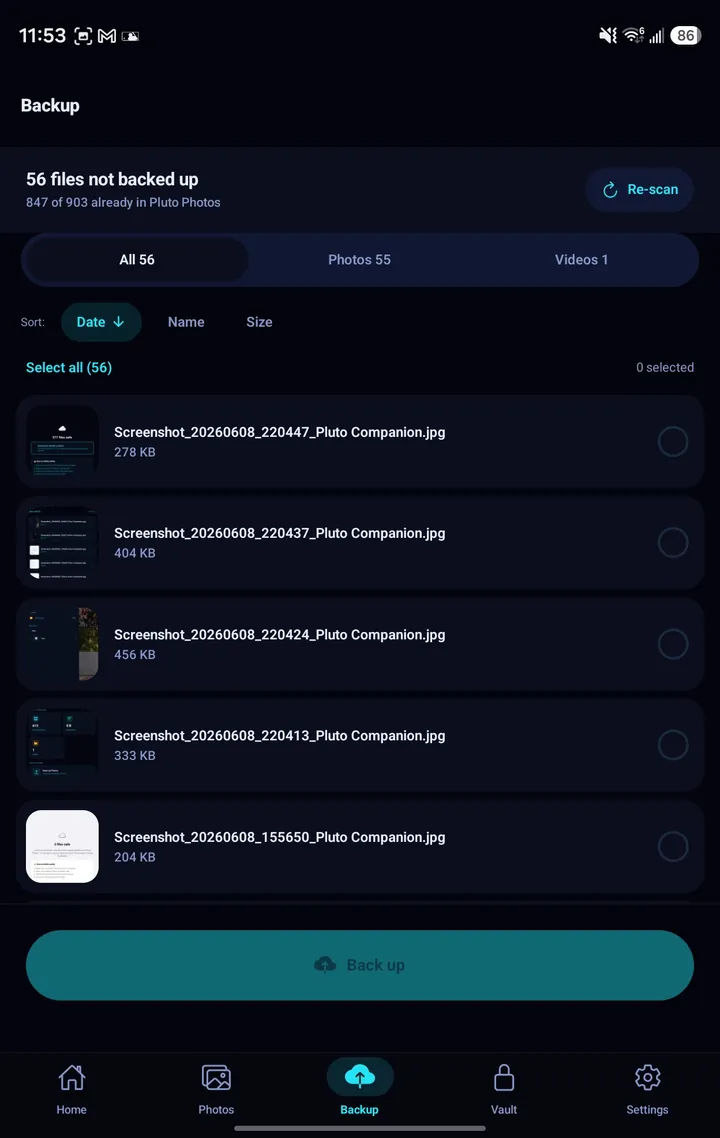
Pluto Companion is the Android app for Pluto Photos: the photos on your phone, organised and backed up to your own computer, with no cloud in between. Browsing, editing and organising what is on your phone is free, and works with no computer at all.

Pluto Companion home screen showing library statistics and On this day memoriesPluto Companion Photos tab with a grid of photosPluto Companion Backup screen listing photos not yet backed up
  • Back up your camera roll to your computer over Wi-Fi, with no cloud and no duplicates
  • Browse your whole Pluto library, people and map from your phone
  • Free up phone space only after each photo is proven to be on your computer
  • Memories and collages made from your own photos, free and with no computer needed
  • Browsing is free. Backup and the other add-on tools need the $5/month subscription and Pluto Photos Pro on your computer. Cancel any time.
Get it on Google Play
AndroidFree to use · subscription adds backup
Releasedv2.5.0October 2026

People, Rebuilt

The People panel has been redesigned from the ground up, and so has the face matching behind it. Pluto now files far more of your photos under the right person on its own, and when it isn't sure, it asks you with the faces themselves, a whole group at a time.

  • Far fewer one-photo "people": Pluto re-checks its earlier guesses as your groups grow
  • Review a whole group at once: tap the faces that are wrong, then confirm the rest
  • Split a group that mixed two people together, and undo any merge
  • Rescanning keeps every name, merge and correction you have made
  • See who is in any photo you open, tag a face the scan missed, and search by a person's name
  • Name people and pick a few reference photos before your first scan
WindowsmacOSLinux
Releasedv2.5.0October 2026

Pets, Rebuilt

Pets now works the way People does: name each of your pets, keep their photos together, and tell Pluto when it got something wrong.

  • Name your pets, and merge or move photos between them
  • A Review tab for the photos Pluto isn't sure about
  • One slider decides how sure Pluto must be before a photo counts
  • New Smart Album rule: any pet, a species, or a pet you have named
WindowsmacOSLinux
Releasedv2.5.0October 2026

Remote Access, Licences & Readability

Your phone can now reach your library away from home, plus smaller changes that make day-to-day use smoother, including two that matter if you use Pluto on more than one computer or bought after a free trial.

  • “Use my phone away from home”: one switch in Admin → Mobile Companion lets Pluto Companion reach your computer from anywhere, with nothing to set up on your router and everything encrypted end to end
  • At the two-computer limit, Settings shows which computers hold your licence and lets you release one
  • Buying after a trial ends unlocks the same copy automatically. No need to re-enter your key
  • Face scanning, finding text in photos and the Magic Wand use your graphics card on Windows, after Pluto checks on your own PC that it is faster and gives exactly the same results
  • Every window now shares one design, with a text-size control, larger buttons and stronger contrast in every theme
  • The Linux download is about 240 MB smaller
  • A damaged photo that crashes the image decoder is now set aside wherever Pluto reads it, so the library opens instead of closing again at every start
WindowsmacOSLinux
Releasedv2.4.21September 2026

Your Folders, All the Way Down

Pluto has always watched a folder and everything inside it, but the sidebar only ever showed the folder itself. Now it shows the whole tree underneath, exactly as it sits on your disk, so a library of years and trips and events is something you can navigate instead of scroll.

  • Expand any watched folder to see the subfolders inside it
  • Every count covers the whole branch, including everything nested below it
  • Drag photos onto a subfolder to move them there, or hold Ctrl to copy
  • Search the sidebar to find a subfolder at any depth
WindowsmacOSLinux
Releasedv2.4.21September 2026

Reliability Fixes

Most of this release is repair: including a fix for clean Windows installs of 2.4.20, where the AI tools could fail while everything else worked perfectly.

  • AI tools no longer fail on a clean Windows install
  • A single damaged photo can no longer close the app while it builds thumbnails
  • A library face scan that cannot start now says why
  • A failed AI tool explains what is missing, instead of passing on a Windows error
WindowsmacOSLinux
Releasedv2.4.20September 2026

New Tools in the Photo Editor

Curve text along any path you draw, combine shapes to make new ones, and finish with a dozen new text effects. Snapshots let you jump back to any point in an edit.

  • Type along any curve, and slide the text into place
  • Combine shapes with unite, subtract, intersect and exclude
  • Twelve new text effects, from chrome and neon to fire and ice
  • Lean and tilt a layer with skew and perspective
  • Snapshots: name a point in an edit and click back to it any time
  • Safe Share can hide anything you draw a box over
WindowsmacOSLinux
Releasedv2.4.20September 2026

A Cleaner Linux Install

Pluto Photos now installs and starts properly on current Ubuntu, Debian and Mint, with nothing extra to track down first.

  • The Debian package sets up its launcher, file types and permissions
  • The portable AppImage runs on Ubuntu 24.04 with no extra packages
Linux
Releasedv2.4.18 · ProSeptember 2026

Memory Movies

Turn a trip, or any day worth remembering, into a short film with music, motion and a title card. Pluto picks the photos, you decide what stays, and the whole thing is made on your own machine. No account, no upload, no cloud render.

  • Start from a suggested Trip, from today's memories, or from any date you pick
  • 28 built-in soundtracks, with photo changes that land on the beat
  • Wide, square or tall, whichever you are sharing to
  • Watch the whole reel before you render it, and drop any photo you would rather leave out
  • Finished movies get their own Memory Movies filter in your library
WindowsmacOSLinuxPro
Releasedv2.4.18September 2026

Sharper Search, a Cleaner Map, Better Translations

A round of fixes to things you use every day: finding text in your photos, reading the map at night, and using Pluto Photos in your own language.

  • Text search in photos now reads street signs, menus and receipts properly, not just scanned documents. Your library re-reads itself in the background
  • Map View's dark style no longer shows a third-party watermark across every tile
  • Hundreds of phrases across all 13 languages were showing raw placeholder text. All corrected
  • Fixed a video whose only change was a picture-in-picture overlay exporting without it
WindowsmacOSLinux
Releasedv2.4.17September 2026

A Real Color & Audio Toolbox

Grade with waveform, RGB parade, vectorscope and histogram scopes, watch levels on live audio meters, and reach for a one-click Look right from the Effects tab.

  • Waveform, parade, vectorscope and histogram scopes
  • Live audio level meters with a clip indicator
  • One-click Looks: Trailer, Dreamy, Retro, Noir
  • New Sharpen, Black & White, Sepia and Invert effects
WindowsmacOSLinux
Releasedv2.4.17September 2026

Titles Worth Keeping On Screen

The video text tool got a full rebuild: style presets, real typography, and a preview that now renders exactly what your export will look like.

  • Title, Lower Third, Caption and Credit style presets
  • Outline, drop shadow, background box and full typography controls
  • Choose from 10 bundled fonts, or any font installed on your computer
WindowsmacOSLinux
Releasedv2.4.17September 2026

Non-Destructive Photo Editing

Adjustment Layers bring non-destructive editing to the photo editor, tweak exposure, color and tone on their own layer without ever touching your pixels.

  • Adjustment layers for exposure, color, tone and 8-band HSL
  • Group layers together to keep complex edits organized
  • New Liquify tool: push, pinch and bloat pixels
WindowsmacOSLinux
Releasedv2.4.17September 2026

Autosave, Privacy and Precision

The photo editor now protects your work automatically and gives you more control over what leaves your computer when you export.

  • Crash recovery: the editor autosaves in the background and offers to restore your work
  • Choose whether an export keeps its camera metadata, and strip GPS location separately
  • Pressure-sensitive brushes for drawing tablets and touchscreens
  • A resizable video timeline and an upgraded face recognition engine
WindowsmacOSLinux
Releasedv2.4.16September 2026

Nested Albums, Actually Organized

Turn any album into a small library of its own, build sub-albums inside it, drag one onto another to reorganize, and collapse the whole thing into a compact tree whenever you just want to see the structure.

  • Sub-albums to any depth, with drag-and-drop reparenting
  • A one-click tree view swaps thumbnails for a compact list of your whole library structure
  • Anything you delete now waits 30 days in Recently Deleted before it's gone for good
  • Organize tags in a tree too, and rename or merge a tag everywhere at once
WindowsmacOSLinux
Releasedv2.4.16September 2026

Find Any Photo in Seconds

A new scrubber runs along the edge of your library whenever you're sorted by date: drag it and watch years fly by, with a label showing exactly where you'll land. On This Day now surfaces memories automatically, too.

  • Drag the new scrubber to fly through your whole library by year and month
  • "On This Day" surfaces memories from past years right above the grid
  • Camera, lens, aperture, ISO and focal length are now saved and searchable for every photo
WindowsmacOSLinux
Releasedv2.4.16September 2026

Power-User Tools for a Growing Library

Rename a whole selection at once, move files between watched folders without leaving the app, and Trips now picks up your videos too.

  • Batch rename a selection with name, number and date patterns
  • Drag a selection onto a folder in the sidebar to move it, hold Ctrl to copy
  • Trips and Map View now include GPS from your videos, not just your photos
  • Favorites, Picks and Screenshot filters for faster culling
WindowsmacOSLinux
Releasedv2.4.16September 2026

Four New Looks for Your Library

Pick a theme that matches how you use Pluto: from a clean, professional light mode to a moody black-on-green terminal look. Every theme covers the whole app: the gallery, the editor and every tool in between.

  • Matrix: black backgrounds and glowing green text
  • Crimson: deep maroon with a crimson-and-gold accent
  • Sepia: warm parchment tones inspired by a darkroom print
  • Light mode text that used to vanish on white backgrounds is fixed everywhere
WindowsmacOSLinux
Releasedv2.4.14 · ProAugust 2026

Object Removal, Rebuilt

Remove Object runs on a new engine that understands what an object was doing in the scene. Its shadow, its reflection and the colour it cast on everything nearby all leave with it, in seconds.

  • Shadows, reflections and colour spill are cleared along with the object
  • Clean edges on brick, foliage and patterned backgrounds
  • A removal takes seconds, and runs entirely on your own machine
  • Click an object to select it, then Apply, most removals are two clicks
  • Frees up to 2.8 GB by tidying away the models it replaces
  • Included with Pro, as a one-time download
WindowsmacOSLinuxPro
Releasedv2.4.14August 2026

A Bigger Editing Toolkit

Three substantial additions to the image editor: a selection tool that understands objects, a full set of layer effects, and a proper brush and gradient engine.

  • Magic Wand: click an object and its outline is traced for you, with a Colour mode for skies and flat backdrops
  • Shape any selection with Refine edge, Expand, Contract and Smooth
  • Twelve layer effects, from stroke and shadows through to bevel and gradient overlays, with one-click presets
  • A brush engine with ten presets, seven tip shapes and full dynamics
  • A multi-stop gradient editor with reflected and diamond styles
WindowsmacOSLinux
Releasedv2.4.14August 2026

Smoother to Move Around

A round of changes that put the things you reach for most within easy reach.

  • Slideshow, Settings and Admin are top-level toolbar buttons
  • A thumbnail size slider sits in the gallery header
  • Zoom in the editor stays anchored to the point under your cursor
WindowsmacOSLinux
Releasedv2.4.13 · ProAugust 2026

People, Rebuilt

Face detection and organisation got a ground-up rebuild. Scanning is dramatically faster on the same offline engine that powers video face blur, and sorting out who is who now happens in bulk.

  • Face scanning is dramatically faster, with GPU acceleration where available
  • A dedicated Non-Faces bin keeps rejected detections out of your people for good
  • Select many faces at once and assign, reject or delete them in a single action
  • A redesigned People panel with named people, unnamed groups and a review queue
  • Review tiles show a close crop of the exact face being asked about
  • Compare any unnamed group against everyone you have named, with a confidence score
WindowsmacOSLinuxPro
Releasedv2.4.13August 2026

Sharper Search, Steadier Backups

Accuracy and reliability work across the library: the descriptions behind contextual search and auto-tagging now come from a full vision-language model, and both Google Photos imports and mobile backups are sturdier.

  • Sharper photo descriptions from a full vision-language model, for more accurate search and auto-tagging
  • Google Photos imports recognise far more file-naming patterns, so more photos keep their original date and location
  • Photos and videos backed up from your phone carry their real capture date
  • Steadier mobile backups over home Wi-Fi
  • Stronger licence verification
WindowsmacOSLinuxAndroid
Releasedv2.4.12August 2026

Mobile Companion: Memories and a Full-Screen Viewer

Two additions to the phone app: a Memories screen for photos from this day in years past, and a full-screen viewer for browsing your backed-up library.

  • An "On This Day" Memories screen, with a notification when there is something to revisit
  • A full-screen photo viewer: swipe through from Home or the gallery grid
  • Steadier backups and notifications
AndroidPersonal & Pro
Releasedv2.4.11August 2026

Faster Imports and Tighter Mobile Security

Importing a library is dramatically faster: thumbnails, capture dates and locations are all read as your photos come in. Map View is now fully self-contained, and the connection between phone and desktop is certificate-pinned.

  • Import is dramatically faster: thumbnails, dates and locations all come from a single read
  • Map View ships its own map code, so it keeps working on networks with no general internet access
  • Background backup on the phone keeps up with large batches, like a wedding or a holiday
  • The encrypted link between phone and desktop is certificate-pinned
WindowsmacOSLinuxAndroid
Releasedv2.4.10August 2026

The Video Editor, Built for Longer Projects

The biggest video update yet. Cut between camera angles that line themselves up, keep several versions of a cut side by side in one project, and shape every movement by hand, then know that if your footage moves to another drive, your edit survives it.

  • Multicam editing: your angles line themselves up from their own audio, then you cut between them live
  • Multiple sequences in one project: reel 1, reel 2 and client versions, all sharing the same footage
  • Nested sequences: collapse a whole section of the timeline into one clip you can reuse
  • A proper keyframe curve editor, so movement eases in and out exactly the way you draw it
  • Media relink: point at one moved file and every other clip beside it reconnects, with your edit untouched
  • A redesigned timeline with separate video, audio, text and picture-in-picture tracks, broadcast timecode, and EDL / Final Cut XML export so your work is never locked inside one app
WindowsmacOSLinux
Releasedv2.4.10 · ProAugust 2026

The Image Editor Goes Press-Ready

Draw with real vectors, place images you can resize forever without losing quality, and see exactly how your photo will come off a printing press before you send it anywhere.

  • Vector pen tool with fully editable paths, convertible to selections
  • Smart objects: scale, rotate and restyle as many times as you like with no loss of quality
  • CMYK soft proofing with out-of-gamut warnings, using the built-in profile or your own printer's
  • Spot colour and duotone channels, including Pantone-style named inks and varnish
  • Export press-ready PDF/X, or one file per printing plate
WindowsmacOSLinux
Releasedv2.4.10August 2026

A Faster Library, and a Long List of Fixes

Large libraries feel noticeably quicker this release. Photo sizes are now worked out up front instead of arriving one thumbnail at a time, so the grid stops rearranging itself under your cursor while it fills in.

  • Smoother scrolling in large libraries: photos no longer shift around as their thumbnails finish
  • Faster imports, especially for iPhone HEIC photos
  • macOS: “Open With → Pluto Photos” and dropping photos on the Dock icon now work
  • Dismissing a contextual search result now works as expected
  • Video export no longer fails when text or watermarks are used from certain install locations
  • Fixed: a clip with animated zoom or position could export far longer than it should have
WindowsmacOSLinux
Releasedv2.4.9August 2026

Remove Object: Lighter on Apple Silicon

Remove Object, including its click-to-select mode, uses considerably less memory on Apple Silicon Macs, for smoother and steadier editing sessions. AI tools across the app also report their status more clearly.

  • Substantially lower peak memory on Apple Silicon
  • Applies to both the brush and click-to-select modes
  • Clearer status messages across the AI tools
macOS
Releasedv2.4.8August 2026

Remove Background: Smoother on Mac

Remove Background and the automatic portrait-blur effect run more smoothly on Mac, and every AI tool now says clearly when a model is still downloading.

  • Remove Background and portrait blur run more smoothly on macOS
  • Remove Background, Remove Object and AI Upscale all show download progress clearly
macOS
Releasedv2.4.7August 2026

macOS Stability and a Lighter Installer

Stability improvements for Apple Silicon Macs, an installer around 150 MB smaller, and steadier pairing in the Mobile Companion app.

  • Steadier launch on Apple Silicon Macs
  • The macOS installer is around 150 MB smaller
  • Mobile Companion: steadier QR-code pairing between phone and desktop
  • Mobile Companion: Delete Account and Sign Out This Device, in the app
macOSAndroid
Releasedv2.4.6August 2026

Faster, Smarter Updates

Updates keep the AI models you have already downloaded rather than fetching them again, and you can choose which drive they live on. Video streaming through the browser and phone is steadier too.

  • Updates keep your existing AI models in place, saving around 900 MB each time
  • Choose where AI models are stored, from Settings, useful if your system drive is small
  • A disk-space check before any model download
  • Steadier video thumbnails and streaming in the browser and mobile app
WindowsmacOSLinux
Releasedv2.4.4August 2026

Reliability Improvements

A batch of refinements to model storage, shared Windows installs, and video streaming to the browser and phone, plus stronger login protection on the LAN server.

  • Settings > Storage: removing a model pack frees its space reliably
  • Models are found consistently on Windows installs shared between accounts
  • Smoother video seeking when streaming to the mobile app or browser
WindowsmacOSLinux
Releasedv2.4.3August 2026

A Smoother First Launch

The app window opens straight away on macOS, Linux and Windows, with the AI models downloading quietly in the background and progress visible in Settings.

  • The window opens immediately on first launch
  • AI models download in the background, with progress in Settings > Storage
  • Steadier reopening from the tray icon
WindowsmacOSLinux
Releasedv2.4.0 · ProJuly 2026

Object Removal: Generative Fill, On Your Own Machine

Click or brush over anything you want gone and a generative model rebuilds the scene behind it, with real texture and structure. Backgrounds like brick, foliage and patterned fabric rebuild convincingly. One engine, tuned for this one job, and nothing to configure.

  • A generative model built specifically for removal, so complex backgrounds rebuild convincingly
  • Click-to-select: click an object and it is outlined for you, or brush over it by hand
  • Shadows and reflections are repaired along with the object itself
  • Runs fully offline, forever. No cloud, no credits, no per-image fees
WindowsmacOSLinuxPro
Releasedv2.4.0 · ProJuly 2026

Image Editor 2.0: Now Photoshop-Class

The built-in editor is a full layered workspace. Open several photos in tabs, work in layers with masks and blend modes, and retouch with a complete tool rail, with all the colour grading you already know still there, now on top of a real layered document.

  • Several images open at once in document tabs, with layers and looks copied between them
  • A full layers panel with masks, blend modes, opacity, lock and merge
  • Brush, eraser, clone stamp, spot heal, dodge and burn, fill, gradient, shapes and text
  • Four selection modes, including a lasso that snaps to edges
  • Safe Share: blur or pixelate faces, plates and documents, all detected on your machine
  • Start from a blank document, or paste a screenshot straight in as a layer
WindowsmacOSLinuxPro
Releasedv2.4.0June 2026

Photo Engine and Format Updates

HEIC photos render everywhere, locations are read automatically on import, and nine more file formats are supported, including AVIF from iOS 16+, Canon CR3 and AVCHD camera video.

  • HEIC photos display correctly, in every iPhone and Android variant
  • Locations are read automatically on import: no manual scan needed
  • New image formats: AVIF (iOS 16+), Canon CR3, Nikon NRW
  • New video formats: MTS/M2TS (AVCHD), WMV, MPG/MPEG, FLV
  • Map View: single-click to open photos, and faster marker tooltips
WindowsmacOSLinux
Releasedv2.4.0June 2026

Mobile Companion

Back photos up from your Android phone straight to Pluto Photos over your home Wi-Fi. No cloud, no third-party servers. Pair with a QR code and it syncs whenever you are on the same network.

  • QR-code pairing in seconds: browsing your library is free
  • End-to-end encryption over your own network
  • Automatic background sync on home Wi-Fi
  • Available now on Google Play for Android
  • Free to browse; the $5/month subscription adds backup, the vault and more, cancel any time
AndroidPersonal & Pro
Releasedv2.4.0 · ProJune 2026

Vault

A PIN-protected private space inside your library. Move photos into the Vault and they leave the main gallery entirely. Only your PIN brings them back. Stored on your own machine, never synced.

  • A PIN keeps photos out of the main library view
  • Entirely local: nothing leaves your machine
  • Change or reset your PIN at any time
  • Windows, macOS and Linux
WindowsmacOSLinuxPersonal & Pro
Releasedv2.4.0 · ProJune 2026

Replication

Mirror your photo folders to a second drive, a NAS, or anywhere else. Set a rule once, then sync on demand or run them all together, a dependable backup copy with no third-party service involved.

  • Unlimited source to destination rules
  • Sync a single rule, or all of them at once
  • Works with external drives, NAS and network paths
  • Warns you when source and destination share a drive
  • Pro tier feature
WindowsmacOSLinuxPro

More on the way

Follow @PlutoPhotosApp for early previews and release announcements.