
What we shipped
Starting in v2.3.14, Pluto Photos includes a video editor. Not a "trim your clip" tool: an actual multi-track storyboard editor with transitions, audio overlays, per-clip color grading, and one-click repair presets.
I built this because every time I wanted to combine a couple of clips from a trip into a single video, I had to leave Pluto Photos, fire up a separate editor, re-import the same files, do the edit, export, then come back. It was annoying. Now the whole workflow lives in one place.
What you can do with it
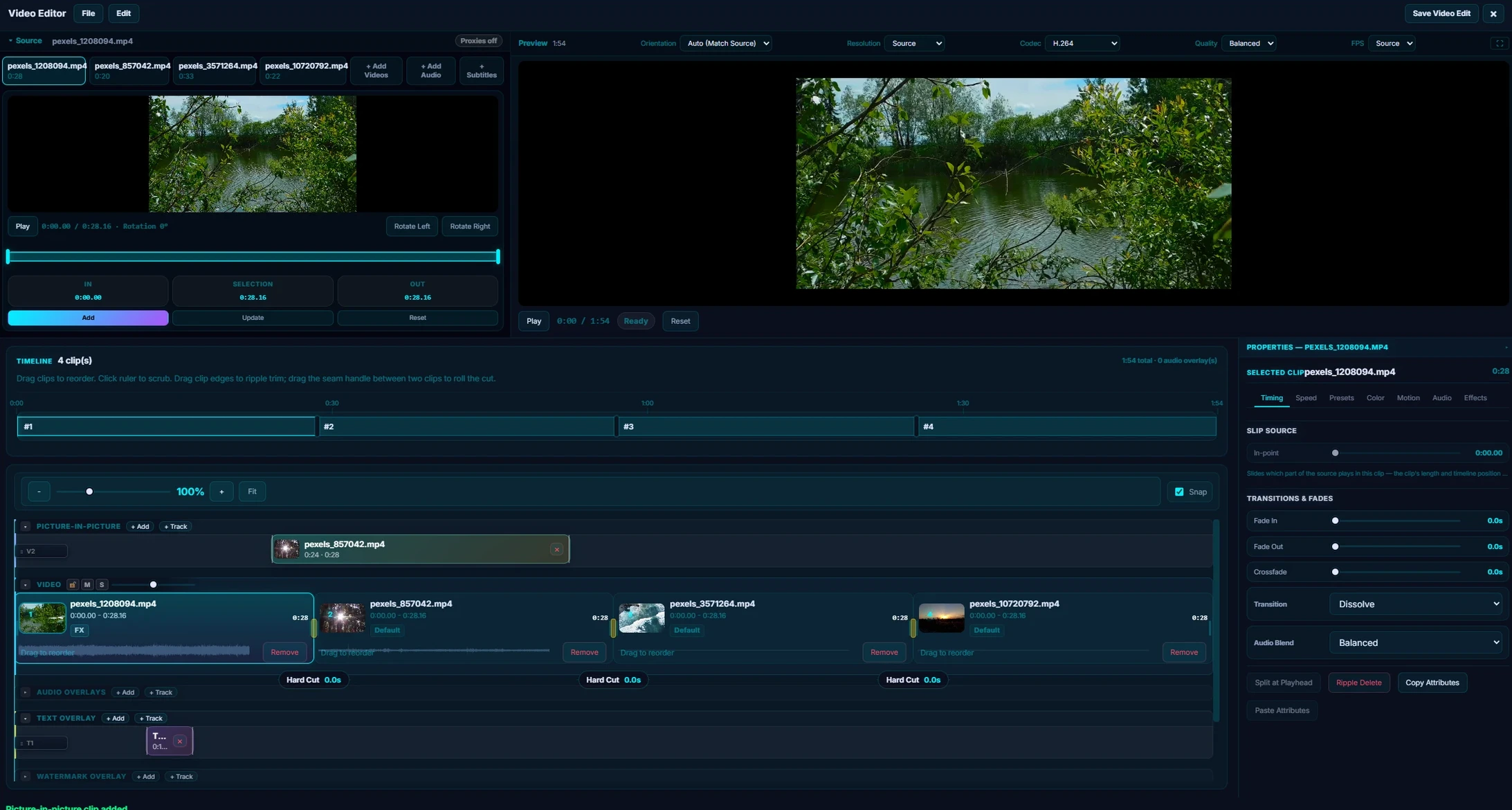
Multi-clip storyboard. Add clips to a visual timeline, drag to reorder, split at the playhead. Each clip has independent in/out points so you can use different sections of the same source video.
Transitions. Crossfade and dip-to-black between clips. Drag the transition handles on the timeline to set the duration. You see it update in real time.
Audio overlays. Drop a music track or narration onto the timeline. Trim it, drag it to the right position, and set how it blends with the clip audio. You can stack multiple audio tracks.
Per-clip controls. Each clip in the timeline has its own settings for:
- Fade in / fade out duration
- Exposure, contrast, saturation, temperature, tint
- Volume, audio clarity, denoise
- Stabilization and jello repair
Repair presets. One-click fixes for common problems: "Clean Dialogue" (boosts voice, reduces background noise), "Low Light Rescue" (bumps exposure and reduces grain), "Mobile Cleanup" (stabilizes shaky phone footage).
Source-quality export. Your final video renders at the original resolution with a progress bar showing the percentage. No watermarks.
How it works under the hood
The editor UI is entirely in the renderer: it's a Vue component with a storyboard timeline, live preview composite, and a clip inspector panel. When you hit Export, it sends the entire project description (clip list, trim points, transitions, audio overlays, filters) to the main process, which assembles a single FFmpeg command and runs it.
The live preview doesn't use FFmpeg: it composites two elements with CSS transforms and opacity fades to approximate what the final export will look like. It's not frame-perfect for transitions, but it's more than accurate enough for editing decisions.
Who gets it
The video editor is a Pro feature ($29 once). It shipped in v2.3.14 and has grown a lot since, with multicam, nested sequences and media relink added in v2.4.10. The free 30-day Pro trial includes it; the free tier is a 500-photo library without the editors.
Download Pluto Photos or see the release notes for the full changelog.