
Find Every Face. Automatically.
Pluto Photos uses on-device AI to detect and group faces across your entire photo library. Name a person once and find them in every photo. No cloud, no uploads, 100% private.
- ~37MBModel size: processor only, no GPU needed
- 4+ coresRecommended processor, scans run in the background
- 10,000sPhotos per library, tested at this scale
- 100%Local: nothing ever uploaded
Automatic detection
Faces are found during import and background scanning. You never click a "scan" button and wait.
Smart clustering
The AI groups similar faces into one person, even across years of photos and changing appearances.
Name once, done forever
Name a face cluster "Mom" or "Sarah" and every past and future photo of them is labeled instantly.
Search by person
Find every photo of a specific person with one click. No scrolling through years of history.
New photos match automatically
Every future import is checked against known people, so the library never falls behind.
Multi-face photos handled correctly
A group shot tags every person in it, not just the largest face in the frame.
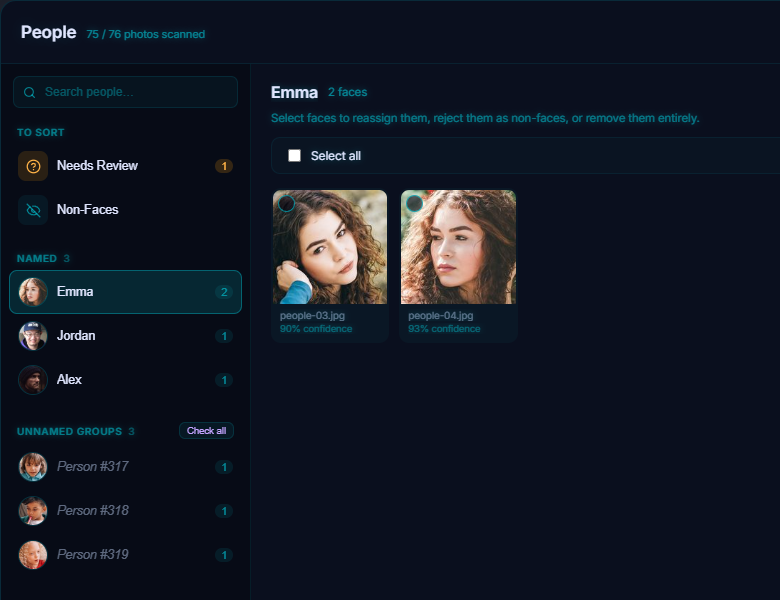
Pluto Photos includes a powerful AI face detection engine that runs entirely on your local machine. Unlike cloud-based services like Google Photos or Apple Photos, your images never leave your computer.
How It Works
When you enable face detection, Pluto Photos scans your library in the background using a lightweight neural network optimized for desktop CPUs. The AI identifies faces in each photo and groups them into clusters of the same person.
You name each cluster once, "Mom", "Dad", "Sarah", and Pluto Photos automatically labels every past and future photo containing that person.
Privacy First
Every major cloud photo service sends your photos to remote servers for face analysis. Pluto Photos processes everything locally. Your face data stays on your machine, encrypted in your library database.
Key Capabilities
- Automatic detection: Faces are found during import and background scanning
- Smart clustering: The AI groups similar faces, even across years of photos
- One-time naming: Name a face cluster once, all matches are labeled instantly
- Search by person: Find all photos of a specific person with one click
- New photo matching: Newly imported photos are automatically matched to known faces
- Multi-face support: Photos with multiple people are tagged with each person
Technical Details
- Runs on the processor: no graphics card needed (a 4-core processor and 8 GB of memory is the minimum, see the system requirements)
- Lightweight models (~37 MB combined: detection + recognition)
- Scans in the background, so you can keep working; the speed depends on your processor
- Built for libraries of tens of thousands of photos; use 16 GB of memory for 50,000 or more
Try AI Face Detection in Pluto Photos
Download free for Windows, macOS, or Linux. AI Face Detection is available in the Pro tier.